
CERTUM BLOG
Certum Solutions Business Resource Hub
Practical insights, expert tips, and fresh ideas to help your business thrive.

Strategic Planning is not just for the Fortune 500
As the leaves turn and the seasons change, pumpkin spice starts peppering desks, and the accounting staff start prepping for end of year, another project hits my desk. Every October through November I take the time to revise our yearly strategic plans for the following year. This year’s looks considerably different from last, given the pivots that took place in March, but many things remain the same.

QuickBooks Enterprise Express Pick and Pack
QuickBooks Enterprise Express Pick and Pack was enhanced in QuickBooks Enterprise Version 2020. While only available in the Platinum (Advanced Inventory) Edition, it is meant to save you time when building out roles, and when switching roles, for picker ad packers, as well as associated actions and approval processes.

How to Update Your Unemployment Rate in QuickBooks Online Full Service Payroll
We’ve been fielding some questions about updating unemployment rates in QuickBooks Online when you have Full-Service Payroll. Let’s talk about how to update your unemployment rate in QuickBooks Online Full Service Payroll.
![QuickBooks Online Automatic Invoice Reminder Emails [Video]](https://images.squarespace-cdn.com/content/v1/5f3134cbe3264f3aee755c45/1599775270898-PAW6NHWSOIJXFLEJYLVR/Katies+Desk+Slide.jpg)
QuickBooks Online Automatic Invoice Reminder Emails [Video]
Automated Invoice reminder emails are set up differently in QuickBooks Online Plus, QuickBooks Online Advanced, and QuickBooks Desktop. These videos go through the two different avenues to send automated reminders to your customer when their payment is due on the QuickBooks Online platform. I will add another post with the QuickBooks Desktop method soon.
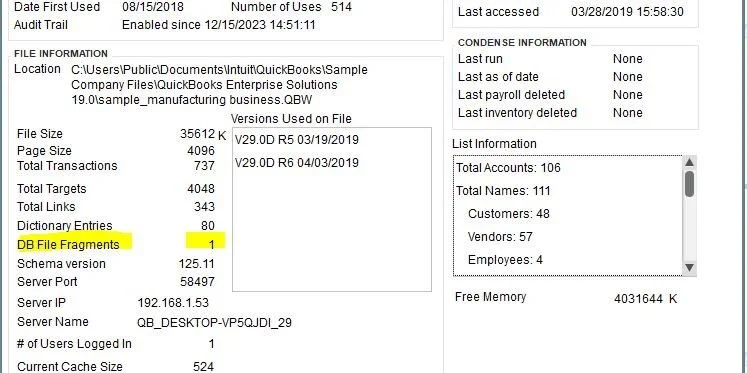
Data File Fragments and How to Fix Them
As you can imagine, the more fragments you have the more of a maintenance issue you have. The lower the number the better it is. The magic number is under 20, but if you are over this then it isn’t the end of the world. You are just in the yellow zone. The fewer fragments you have the quicker that the file can be read. File fragments in and of themselves are not the problem – you will never have 0 fragments. They are just one of the gauges to measure file health (highest I’ve seen was over 300, and that was a rough one!).
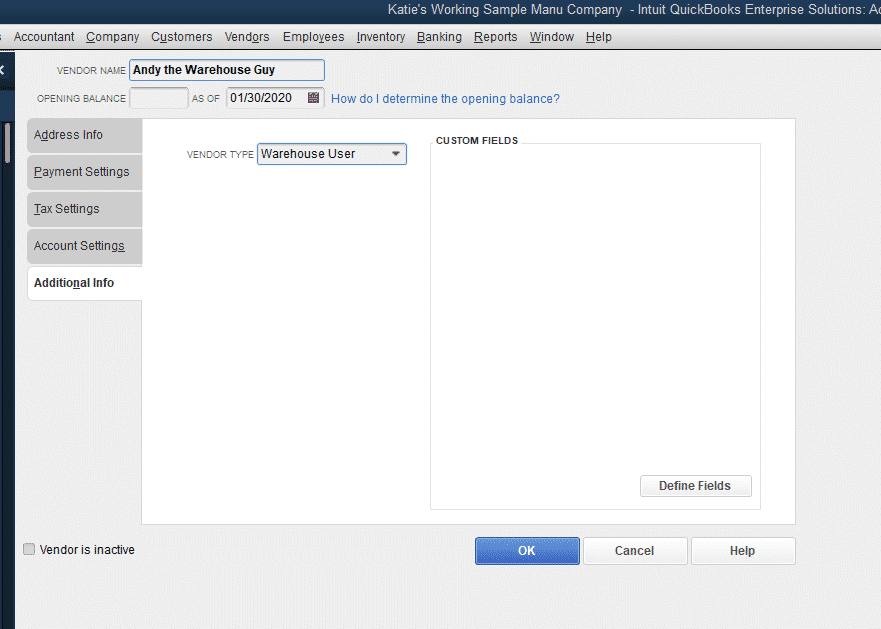
Setting Up Warehouse Worker Users in QuickBooks Enterprise
I have the inventory scanner, barcode scanner, setting up the Advanced Inventory preferences…everything… NO USERS.
So, we are about to fix that.

Turning on Advanced Inventory in QuickBooks Enterprise
Many of our posts are based in QuickBooks Enterprise and require Advanced Inventory to be on (required Platinum or higher subscription). To turn on Advanced Inventory, you will open up QuickBooks Enterprise and navigate to Preferences, under the Edit menu.
How to Enter Checks in QuickBooks Online, and When to Use Checks Instead of Enter Expenses
In this quick video I show you how to enter a check in QuickBooks Online (we used Advanced, but it will work for all QuickBooks Online editions). You will also learn when you would want to use the Write Checks function instead of the Enter Expenses function. While you can enter checks using the Expenses screen, I don’t recommend it typically for a few reasons. If these reasons are not important to your business, then using the Expenses screen is sufficient.

Things to Consider when Changing Software
As an Accredited Business Consultant, I focus on navigating the ever-changing balance between tech and people. When companies are changing software this differentiation becomes incredibly important to be aware of. My mantra is to let people do people stuff, and let tech do tech stuff. Knowing how to leverage the tools you have available for your business – no kidding – will make you money.

What’s Unapplied Cash Payments in QuickBooks Online?
You are running your reports at the end of the month, and come across an odd account on your P&L. Maybe your accountant asked about it, maybe it just stuck out like a sore thumb. Unapplied Cash Payments in QuickBooks are a funny animal. There seems to be a number there, and if you don’t know what it is, it takes way more time than necessary to fix!

Using the Chronobooks Backup for Your QuickBooks Online Advanced File
We were an early adopter of ChronoBooks, the newly acquired backup service for QuickBooks Online Advanced. A few years ago, we reached out to Nate, and were excited about his new service that was able to seamlessly backup QuickBooks files in case of issue.

How to Calculate Landed Costs in QuickBooks Enterprise
In a previous post we set up our QuickBooks Enterprise file to calculate Landed Cost, or the cost to get an inventory item to a recipient’s door. Landed cost is important, because it helps you understand the total cost of your items that are shipped, instead of only calculating the cost of creating the item. As any manufacturer or distributor knows, knowing your COGS (Cost of Goods Sold) is a critical need for business planning and pricing. If you need a refresher on how to turn on Landed Cost, please see the previous article below, then carry on with our post.
Printable Resources
Subscribe to our monthly email newsletter!
More From Certum Solutions
Explore Additional Services
Certum connects it to your inventory, payroll, operations, and financial strategy — so every part of your business runs on the same source of truth.
QBO, Odoo, Xero, Zoho & more
Let's figure out what your business actually needs
You don't need more software recommendations from someone who doesn't know your business. You need a straight answer from someone who does. Tell us where you're at; we'll tell you exactly what makes sense next, whether that's cleaning up your books, switching platforms, or building a financial system from the ground up. No pressure, no obligation, just clarity.
Prefer to call? (980) 210-6946