
Ongoing Support in QuickBooks for Growing Businesses
QuickBooks should feel stable, not stressful. But for most growing businesses, it doesn't. Reports pull wrong numbers. Reconciliations fall behind. A new employee enters transactions incorrectly and no one catches it for months. The software isn't broken — the system around it is. Certum Solutions' QuickBooks Managed Support gives your business an experienced QuickBooks partner who stays inside your system on an ongoing basis, catching issues before they become problems, keeping your data clean, and making sure your books actually reflect what's happening in your business.
✔️ Woman-Owned & BBB Accredited
✔️ Accountants Who Speak Tech
✔️ Platform-Agnostic Advisors
✔️ Local Roots, National Reach
What Is QuickBooks Managed Support?
QuickBooks Managed Support is an ongoing service where Certum Solutions acts as your dedicated QuickBooks resource — available when you need help, monitoring your system regularly, and handling the QuickBooks tasks your internal team shouldn't have to figure out alone. It's different from one-time implementation or cleanup. Those are projects with a start and end date. Managed Support is a continuous relationship. We stay in your corner as your business grows, your team changes, and your QuickBooks needs evolve. Think of it as having a QuickBooks expert on-call; without the cost of hiring a full-time QuickBooks administrator.
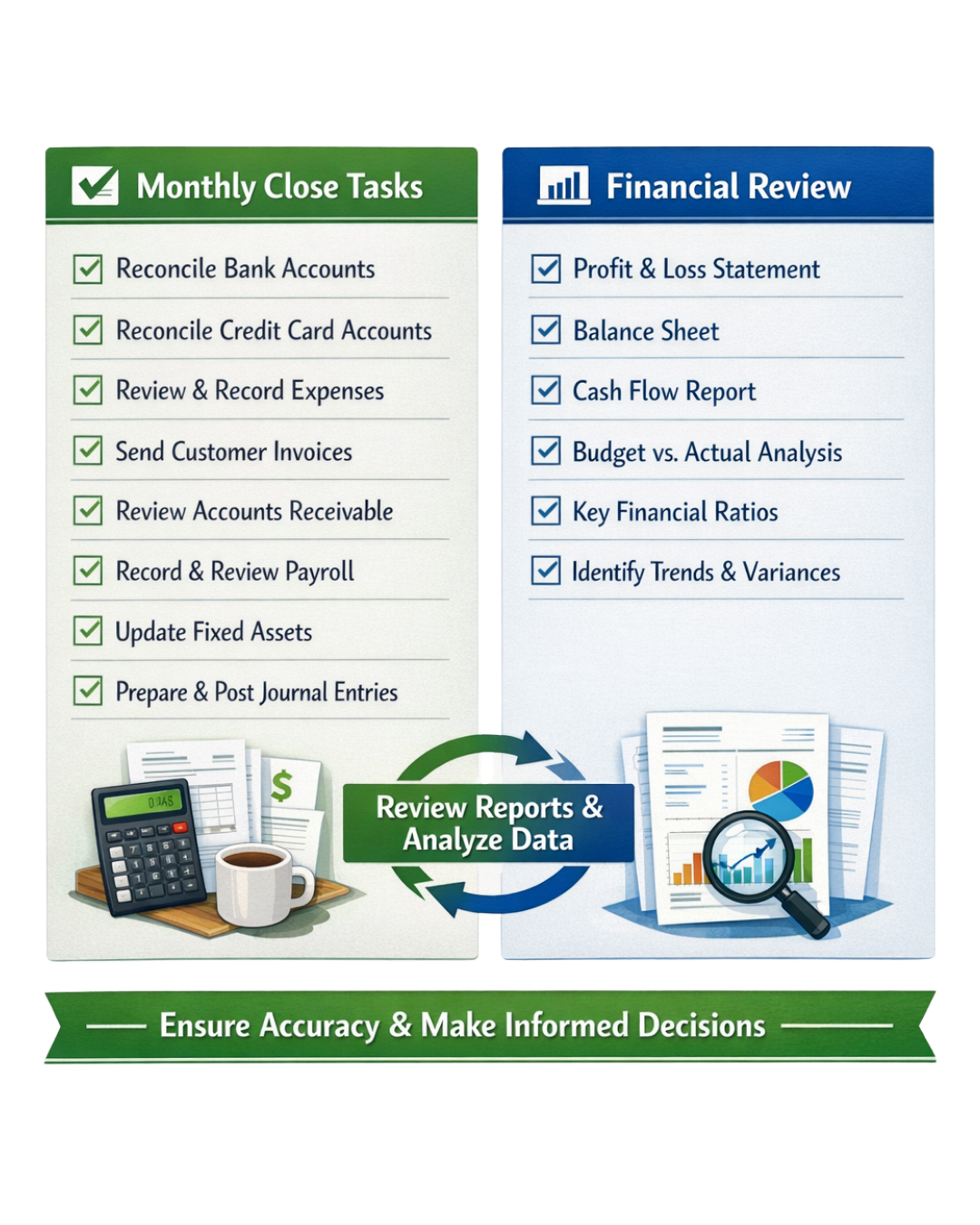
Includes:
Workflow improvements (AR/AP, approvals, close)
Troubleshooting recurring posting issues
Reporting structure and dashboard guidance
Controls + permissions cleanup
Month-end close support and review cadence
This is ongoing operational support for QuickBooks; the layer between “we have software” and “we have clean processes.”
Who Managed Support Is Built For
QuickBooks Managed Support is the right fit for businesses that:
Have QuickBooks set up but lack an internal expert to manage it day-to-day
Have experienced staff turnover that left their books inconsistently maintained
Are growing quickly and need QuickBooks to keep pace without falling apart
Want someone to call when something goes wrong — without opening a generic Intuit support ticket
Are using QuickBooks Online, QuickBooks Enterprise, or Intuit Enterprise Suite and want ongoing expert oversight
Run between $100K and $50M in annual revenue and need more than basic bookkeeping but aren't ready for a full ERP support contract
If your QuickBooks works, but barely; and you spend too much time worrying about whether your numbers are right, managed support is designed for exactly that situation.
What's Included in Certum's QuickBooks Managed Support
Every managed support engagement is scoped to your specific environment, but most clients receive a combination of the following:
Ongoing System Monitoring
We regularly review your QuickBooks file for data integrity issues, miscategorized transactions, duplicate entries, and report inconsistencies — catching problems before they compound into expensive corrections.
User & Workflow Support
When your team has questions about how to enter transactions correctly, set up new customers or vendors, handle payroll entries, or run specific reports, they get answers from an expert — not a generic help article.
Reconciliation Oversight
We monitor that monthly bank and credit card reconciliations are being completed correctly and on time. If reconciliations are falling behind, we step in to bring them current.
Software Updates & Version Management
QuickBooks updates frequently. We ensure your system stays current, that updates don't disrupt your workflows, and that any new features relevant to your business get properly configured.
Report Review & Optimization
We periodically review your standard financial reports — P&L, balance sheet, cash flow — to ensure they're structured correctly and actually answering the questions your leadership needs answered.
Priority Access to Our Team
Managed support clients receive priority response. When something breaks or a question is urgent, you're not waiting in a general queue — you have a direct line to the Certum team.
Periodic Check-In Calls
Depending on your plan, we schedule regular check-in calls to review your QuickBooks health, address pending questions, and proactively plan for upcoming needs such as year-end, tax prep, payroll changes, and new integrations.
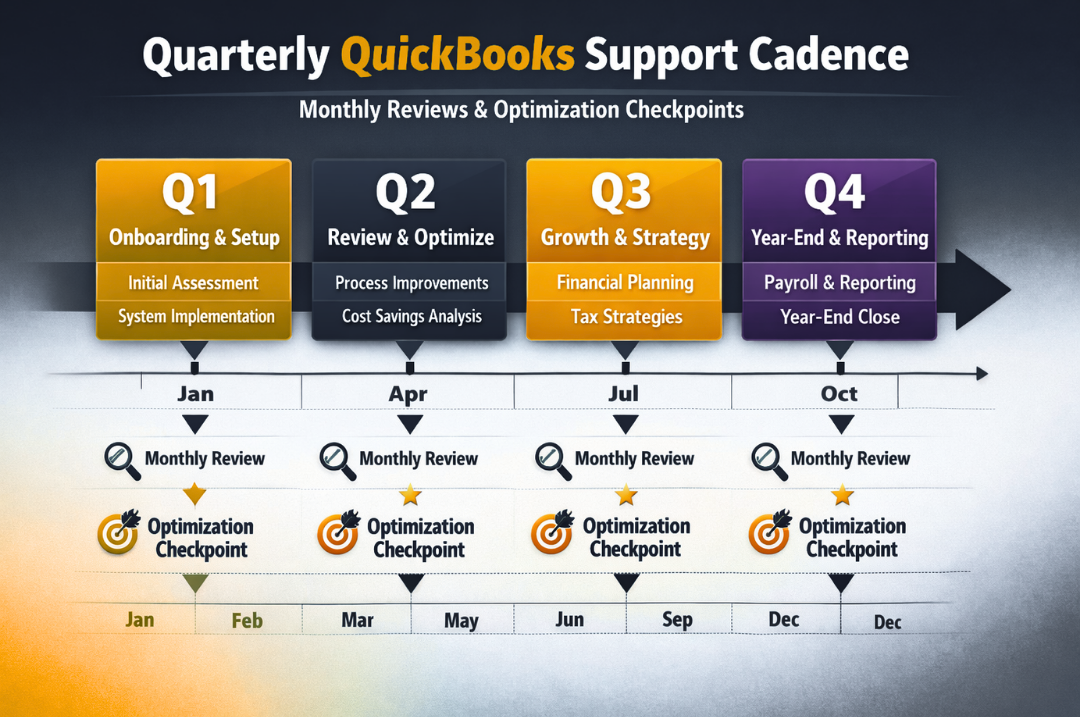
Managed Support vs. One-Time Support: What's the Difference?
Many businesses call us when something is already broken. That's what one-time or project-based support is for — a specific issue, a cleanup engagement, a one-time training session.
Managed Support is proactive rather than reactive. Instead of fixing problems after they cost you time and money, we prevent them from happening. The businesses that get the most value from managed support are the ones who recognize that consistent oversight is cheaper than periodic emergencies.

QuickBooks Versions We Support on an Ongoing Basis
Not sure which version you have or whether it's the right fit for where your business is going? We'll evaluate that as part of your onboarding.
Why Businesses Choose Certum Over Generic QuickBooks Support
Intuit offers its own support line. So do dozens of freelance bookkeepers and virtual assistants. Here's what makes Certum different:
✔️ We're accountants first. Our team understands the accounting logic behind QuickBooks — not just the software buttons. That means we catch issues others miss.
✔️ We're platform-agnostic advisors. If QuickBooks stops being the right tool as your business grows, we'll tell you — and help you transition smoothly rather than holding you to a platform that no longer fits.
✔️ 15+ years of QuickBooks environments. We've worked inside hundreds of QuickBooks files across construction, manufacturing, retail, nonprofits, professional services, and more.
✔️ We're a certified Intuit partner. That means direct access to Intuit resources, early visibility into product changes, and a support relationship that goes beyond what a standard user gets.
✔️ Nationwide remote support. We serve businesses across the U.S. — no geographic limitations, no requirement to be local.

Need more than QuickBooks support? We do the books too.
QuickBooks Managed Support keeps your system running right. But if you need someone to actually do your monthly bookkeeping — recording transactions, reconciling accounts, and delivering reports — our full bookkeeping service includes all of that, plus senior accountant oversight every month.
✓ US-based team, always ✓ Senior accountant reviews your books monthly ✓ Certified in your software ✓ 15+ in Business ✓ BBB Certified




Let's figure out what your business actually needs
Tell us where you're at; we'll tell you exactly what makes sense next, whether that's cleaning up your books, switching platforms, or building a financial system from the ground up. No pressure, no obligation, just clarity.
Prefer to call? (980) 210-6946
Reviews
What Our Clients Are Saying
4.6/5.0 on Google · Read all reviews →
Top Financial Advising & Planning Company, North Carolina 2026 · View our Clutch profile →
“Not only do I trust your team to be doing the work accurately for me behind the scenes, but also to be consistently training me up on how I can use the tools.”— Michael Reddington, Professional Services Business Review
“They are transparent and honest. Unlike other companies that will simply nod and say they can do it all, Certum will ensure that the client is aware of limitations or incompatibilities early on, further helping establish expectations before the project is afoot.”— James Frey,
IT Consulting Business Review
“When I reached out to Certum Solutions, I felt like a hand was reaching down and lifting me back up. They gave me the support I needed when I didn’t think I could handle any more on my own.”— Vicki Carnes, Nonprofit Business Review
QuickBooks Resources
Guides, case studies & tutorials from Certum
Created from real client work — not theory. Use these to learn more before your consultation, or share with your team after go-live.

FAQ
-
Managed support is typically structured and scoped to your specific environment and usage level. During your initial consultation, we'll outline what's included and provide a clear monthly rate— no surprise fees or hourly overages.
-
Yes — and many of our clients do exactly this. After we complete a QuickBooks implementation or cleanup project, businesses often choose to stay on with a managed support plan so they have ongoing oversight as their team grows into the new system.
-
Possibly. If your books have significant data issues, we typically recommend a QuickBooks Cleanup engagement before starting managed support — so we're maintaining a clean foundation rather than managing around existing problems. We'll assess this during your consultation.
-
Yes. We support all QuickBooks products including Enterprise, Online, and Intuit Enterprise Suite on an ongoing basis. Enterprise environments often benefit most from managed support given their complexity and the number of users involved.
-
Managed support clients receive priority response. Most requests are addressed within one business day, and urgent issues are escalated accordingly. Response expectations are outlined clearly in your service agreement.
Ready to stop worrying about your QuickBooks?
Let's talk about what managed support looks like for your business. The first conversation is free.
✓ Certified QuickBooks Partner
✓ Certified QuickBooks Solutions Provider
✓ Serving Nationwide in The U.S.