
Intuit Elite Partner since 2012 · QuickBooks ProAdvisors since 2005
Move to a new accounting system with every balance intact
Certum Solutions migrates accounting and ERP software for growing U.S. businesses: your data, your history, and your integrations, cleaned up before they move and reconciled before you go live.
13 Intuit
awards
Incl. 2022 Trailblazer of the Year
BBB A+ accredited
Woman-owned, Monroe, NC
Multi-platform partner
Zoho · Cin7 · Katana · Summit
500+ Businesses
Served across all 50 states
Intuit Elite Partner
QuickBooks Solution Provider since 2012
✓ Platform-agnostic
✓ Accountants run every migration
✓ Staged fixed-fee pricing
✓ U.S.-based team
Why migrations go wrong
Most failed migrations were never a software problem
An accounting software migration fails when the data, history, integrations, or timing weren't planned before the move. The new system works fine. It just inherited every problem the old one had, plus a few new ones.

The cutover date fights the calendar
A switch in the middle of year-end close, payroll season, or tax prep splits a year across two systems and leaves no one with time to validate the numbers.
History decisions get made too late
Full detail, summarized history, or opening balances only: each choice changes the timeline and the reports you'll have. Deciding mid-project stalls everything.
Dirty data moves with you
Unreconciled accounts, duplicate vendors, and balances that never tied out transfer exactly as they are. Six months later, the new system's reports don't match reality.
Integrations break quietly
Payroll, inventory, e-commerce, and banking connections have to be reconnected and tested, and some apps have no version for the new platform at all.
Migration paths
Where you're starting, and where you're going
Certum Solutions is platform-agnostic, so we recommend the destination that fits how your business runs. Each path below has its own detailed page.
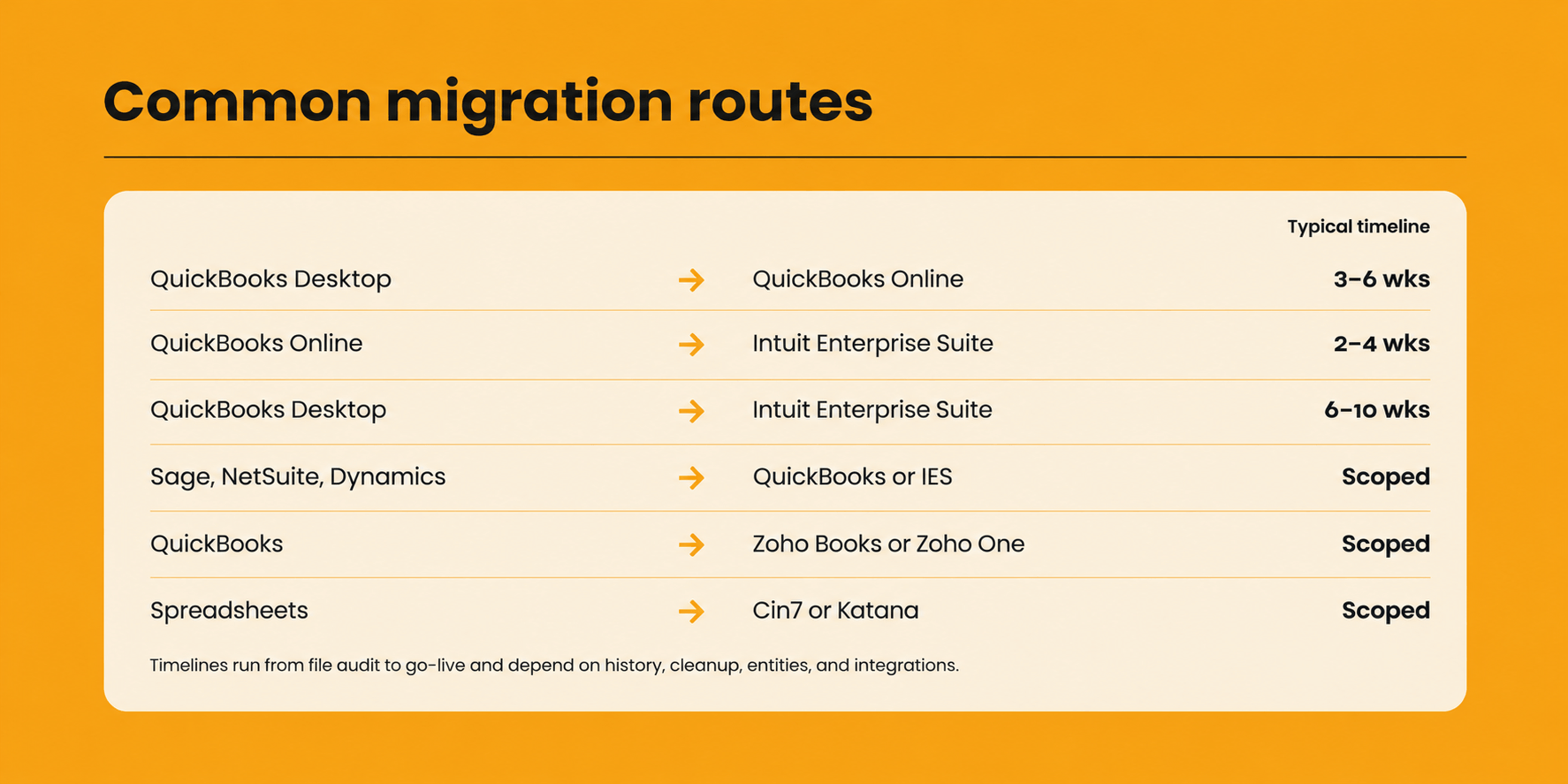
QuickBooks Desktop → QuickBooks Online
The most common move we handle. We audit the Desktop file, fix errors before they transfer, rebuild the chart of accounts, and reconnect your apps.
Typically 3–6 weeks
One payroll provider → another
Employee records, tax setup, and year-to-date totals moved between ADP, Gusto, Paychex, and QuickBooks Payroll, timed around your pay calendar.
Best at a quarter or year start
Sage, NetSuite, Dynamics → QuickBooks or IES
Historical data from legacy accounting systems and ERPs, mapped field by field into QuickBooks or Intuit Enterprise Suite with a full audit trail.
Scoped during discovery
QuickBooks → Zoho Books or Zoho One
For businesses consolidating CRM, inventory, HR, and accounting into one Zoho ecosystem. Chart of accounts mapping, history, and first close included.
Scoped during discovery
QuickBooks → Intuit Enterprise Suite
For multi-entity businesses and teams that need reporting by department, location, or project. We design the entity structure before anything moves.
2–4 weeks from Online · 6–10 weeks from Desktop
Spreadsheets or basic tools → Cin7 or Katana
Items, quantities, costs, and locations moved into a dedicated inventory system that syncs with your accounting software.
Scoped during discovery
Still running the business on spreadsheets? Read how to move from Excel to accounting software. Moving to a full ERP? See our ERP implementation services.
What transfers
What moves in an accounting data migration, and what has to be rebuilt
Every accounting data migration moves most core financial records. Some settings need review, and some pieces have to be rebuilt in the new system no matter which platforms are involved.
| What happens to it | Typical examples |
|---|---|
| Moves directly | Chart of accounts, customers, vendors, products and services, open invoices and bills, bank and credit card balances, transaction history |
| Moves, then needs review | Sales tax settings, classes, locations and departments, user permissions, recurring transactions |
| Has to be rebuilt | Custom reports, invoice templates, payroll setup, bank feed connections, third-party integrations |
| May have no equivalent | Platform-specific features and add-ons, which is why the destination decision comes first |
Very large files can exceed a destination's import limits. When that happens, the options are moving lists and balances only, condensing the file first, or a manual migration scoped in advance. Our QuickBooks migration checklist covers what to check before you start.
How we migrate
Five stages, priced before each one starts
Every Certum migration follows the same sequence, whichever systems are involved. Nothing goes live until every balance ties out.
Discovery and scoping
File audit, list of every connected app, destination and history decisions, written scope and fixed fee.
2. Discovery and scoping
Fix old errors in the source data, then build the new chart of accounts, entities, users, and integrations.
3. Test migration
A trial data move, compared line by line against trial balance, receivables, payables, and bank balances.
4. Cutover and reconcile
Stop the old system at the cutover date, load final balances and history, and reconcile every account.
5. Go-live and training
Role-based training in your live system, and your first month-end close completed with our team.
Migrations are priced as staged fixed fees, not hourly billing. You approve the scope and price for each stage before it begins, so there are no surprise invoices mid-project.
TIMING
When is the best time to switch accounting software?
The best time to switch accounting software is the start of a fiscal year, which is January 1 for most businesses. Payroll year-to-date totals start at zero, each year's W-2s and 1099s come from one system, and your reports compare full years instead of years split across two platforms.
To start January 1, the project typically needs to kick off by mid-November, because the destination, history, and cleanup decisions have to be made before the build begins. If that window has passed, a quarter-end is the next clean option.
January 1 Cleanest date of the year. Kick off by mid-November.
April 1 Most common second choice, after tax season.
July 1 Mid-year quarter start. Payroll year-to-date totals need to be loaded.
October 1 Gives a full quarter of practice in the new system before year-end close.