
FREE RESOURCES FOR BUSINESSES
Accounting & ERP Guides, Comparisons, and Tools for Growing Businesses
Still trying to figure out whether QuickBooks, Xero, Zoho, or a full ERP system is the right fit; or whether your current setup just needs to be cleaned up and configured properly? This is where Certum Solutions publishes the guides, comparisons, checklists, and case studies we wish more businesses had before they signed a software contract or hired a bookkeeper. Everything here is written by our own accounting and ERP consulting team for U.S.-based small and mid-sized businesses (roughly $1M–$50M in revenue) evaluating their systems in 2026; not outside contributors guessing at what matters.
Not sure where to start?

Head-to-head breakdowns of QuickBooks, Xero, Zoho, Odoo, and ERP options, built to help you decide, not just compare features.Free checklists, templates, and calculators you can use todayStep-by-step walkthroughs recorded inside real QuickBooks, Xero, and ERP accounts.Real Certum client stories: the problem, the system we implemented, and the result.In-depth articles on QuickBooks, Xero, Zoho, ERP, & running the financial side of your business.Latest from Certum
The newest guides, updates, and breakdowns from our team — covering QuickBooks, Xero, Zoho, ERP, and everything in between.

How to Use and Manage Receipts in QuickBooks Online
This guide explains how to capture, attach, and manage receipts in QuickBooks Online. It covers three ways to get receipts into QuickBooks; the mobile app camera, desktop file upload, and team email forwarding. Followed by how to review, categorize, and save each receipt correctly. The guide also covers attaching receipt images directly to transactions for audit purposes. Who is it for? Small business owners, bookkeepers, and office managers who use QuickBooks Online and want a cleaner, more organized system for tracking business expenses.



4 QuickBooks Online Features To Enhance Your Workflow and Boost Your Business
The latest quartet of QBO features does just that, helping you track your team’s progress and performance, automate the workflow experience, digitize the document process, and get access to hundreds of apps to alleviate your day-to-day grind.
QuickBooks Enterprise Express Pick and Pack
QuickBooks Enterprise Express Pick and Pack was enhanced in QuickBooks Enterprise Version 2020. While only available in the Platinum (Advanced Inventory) Edition, it is meant to save you time when building out roles, and when switching roles, for picker ad packers, as well as associated actions and approval processes.
How to Update Your Unemployment Rate in QuickBooks Online Full Service Payroll
We’ve been fielding some questions about updating unemployment rates in QuickBooks Online when you have Full-Service Payroll. Let’s talk about how to update your unemployment rate in QuickBooks Online Full Service Payroll.
Data File Fragments and How to Fix Them
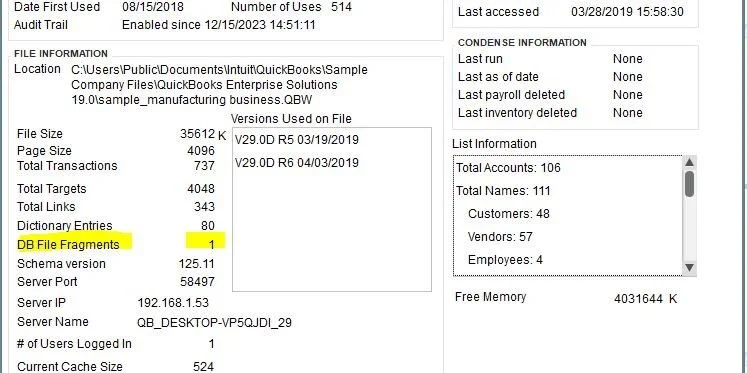
As you can imagine, the more fragments you have the more of a maintenance issue you have. The lower the number the better it is. The magic number is under 20, but if you are over this then it isn’t the end of the world. You are just in the yellow zone. The fewer fragments you have the quicker that the file can be read. File fragments in and of themselves are not the problem – you will never have 0 fragments. They are just one of the gauges to measure file health (highest I’ve seen was over 300, and that was a rough one!).
Setting Up Warehouse Worker Users in QuickBooks Enterprise
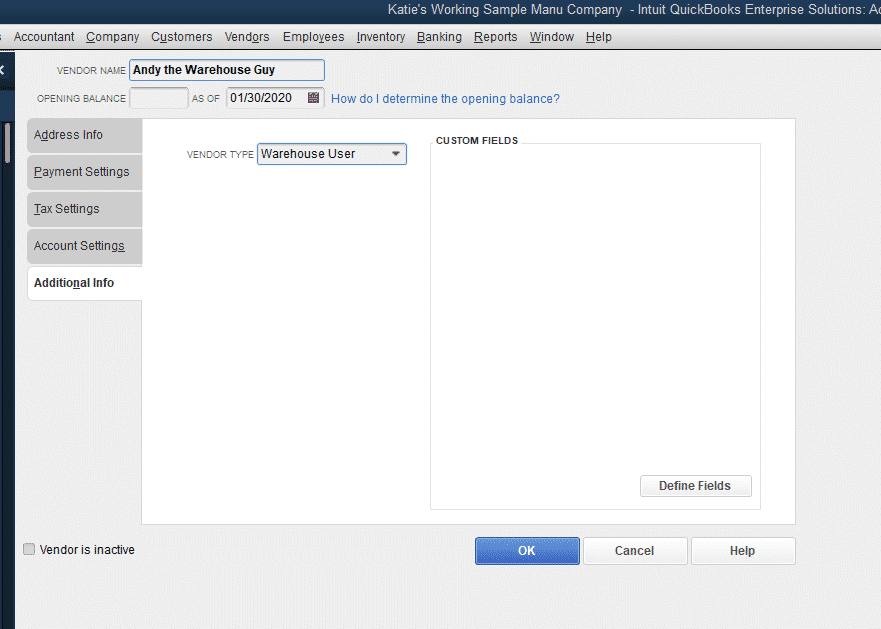
I have the inventory scanner, barcode scanner, setting up the Advanced Inventory preferences…everything… NO USERS.
So, we are about to fix that.

Turning on Advanced Inventory in QuickBooks Enterprise
Many of our posts are based in QuickBooks Enterprise and require Advanced Inventory to be on (required Platinum or higher subscription). To turn on Advanced Inventory, you will open up QuickBooks Enterprise and navigate to Preferences, under the Edit menu.
FAQ
Frequently Asked Questions
-
Guides, comparisons, checklists, video tutorials, and client case studies covering QuickBooks, Xero, Zoho, ERP systems, inventory software, and general accounting topics for small and mid-sized businesses.
-
Certum's own accounting and ERP consulting team writes everything here, based on client implementations we've actually done — not generic outside content.
-
All three, plus Odoo, Cin7, Katana, and other ERP and inventory platforms. Certum is vendor-neutral, so the content reflects what actually fits different business situations, not one software brand.
-
Everything in the resource library — guides, checklists, comparisons, and downloads — is free to read and download, whether or not you're a Certum client.
-
New guides and comparisons are added regularly, and existing posts are updated when software pricing, features, or plans change (like the 2026 QuickBooks Online price increase).
-
Start with the Software Comparisons category, or book a free consultation and tell us where you're at — we'll point you to the right guide or give you a direct answer.
-
Yes. Contact us at help@certumsolutions.com with what you'd like covered.
Featured
Featured Resources
Our most-requested guides, tools, and breakdowns — picked for businesses actively evaluating software, cleaning up their books, or getting ready to scale.
Printable Resources
More From Certum Solutions
Explore Additional Services
Certum connects it to your inventory, payroll, operations, and financial strategy — so every part of your business runs on the same source of truth.
Subscribe to our monthly email newsletter!
Let's figure out what your business actually needs
You don't need more software recommendations from someone who doesn't know your business. You need a straight answer from someone who does. Tell us where you're at; we'll tell you exactly what makes sense next, whether that's cleaning up your books, switching platforms, or building a financial system from the ground up. No pressure, no obligation, just clarity.
Prefer to call? (980) 210-6946