
QuickBooks Desktop Support Is Ending — Here's Exactly What Changes & What to Do
Deadline: May 31, 2026 QuickBooks Desktop 2023 including Enterprise 23.0, Pro Plus, Premier Plus, and Mac Plus officially loses payroll, bank feeds, payment processing, and Intuit support on this date. This affects all 2023 version users regardless of when your individual annual subscription renews. See the full migration checklist
We've been hearing from a lot of businesses, current clients, and people who found us searching for answers, all with some version of the same question: "We got a message in QuickBooks about service ending May 31st & needing to upgrade… Is this automatic? Do we need to do something? Can we just ignore it?"
The short answer: you can't ignore it if you use payroll, bank feeds, or payment processing. And it is not automatic; this requires action on your part. This article covers exactly what's changing, what still works, and the three paths forward, so you can make the right call for your business before the deadline hits.
In This Article
What is actually happening on May 31, 2026?
What stops working and what doesn't
Which QuickBooks versions are affected?
Your 3 options explained
If you're transitioning to a new ERP: can you go month-to-month?
What to do before May 31
Frequently asked questions
Update as of July 30, 2026: The May 31, 2026 deadline referenced below has passed — Desktop 2023 has already lost payroll, bank feeds, and security updates. If you're reading this now, either you're dealing with that firsthand, or you're on Desktop 2024, which is supported through September 30, 2027 and is the last version Intuit will ever release for Pro or Premier. Everything below still applies to you either way.
What Is Actually Happening to QuickBooks Desktop 2023 on May 31, 2026?
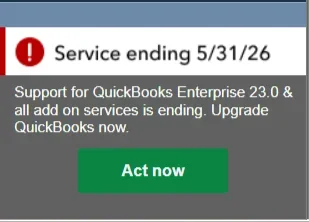
Service Ending Error Message QuickBooks Desktop 2023
This is part of Intuit's standard rolling three-year lifecycle for QuickBooks Desktop versions. Each version is supported for roughly three years from its release date. When that window closes, Intuit stops providing security updates, technical support, and the backend connectivity that powers these features like payroll and bank feeds.
This is not a new policy; Intuit has followed this same schedule with every prior version. QuickBooks Desktop 2022 went through the same sunset on May 31, 2025. The 2023 version is next.
Important clarification: This is a service discontinuation, not a complete shutdown. QuickBooks will not lock you out of your company file on June 1st. The software itself will still open. What stops working are the features that connect to Intuit's servers, and for most businesses, those are significant.
*Note on timing: The May 31, 2026, service cut off applies universally to all QuickBooks Desktop 2023 users; it does not depend on when your individual annual subscription renews. Your subscription renewal date is separate and determines when you lose access to the software itself. The service cutoff hits everyone on the 2023 version on the same date.
What Stops Working in QuickBooks Desktop 2023 After May 31
Here's the clear breakdown of what changes after May 31, 2026, per Intuit's official discontinuation policy:
What Stops Working
Payroll Services: All payroll tiers are affected. Assisted Payroll will be deactivated, and tax forms will no longer be filed on your behalf. Basic and Enhanced Payroll will stop calculating taxes automatically; paychecks may show inaccuracies. QuickBooks Workforce will also be inaccessible for you and your employees.
Online Bank Feeds: You won't be able to download transactions, send online payments, or send online transfers. Uploading transactions will also be discontinued. You'd have to enter transactions manually.
Payment Processing: Credit card and ACH transactions cannot be processed through QuickBooks Desktop 2023. eInvoice (email of invoice with pay link) will also stop working.
Note: if you have recurring payments set up, those transactions will continue to process but you'll need to manage them outside QuickBooks at https://merchantcenter.intuit.com/msc/portal/home. Learn more here: https://quickbooks.intuit.com/learn-support/en-us/help-article/process-credit-card-payments/process-payments-merchant-service-center/L4t0JMv2G_US_en_USSecurity Updates: No more patches. Your financial data will sit on software that won't be updated against new vulnerabilities which is a real compliance and security concern for businesses handling customer payment data or payroll records.
Live Technical Support: Intuit will no longer assist with issues on 2023 versions.
Email of Forms and Reports: You will not be able to email invoices, reports, or other forms directly from QuickBooks Desktop 2023 after May 31.
Shipping Manager: Access to the QuickBooks 2023 shipping experience will be discontinued.
Other Connected Services: Multi-currency and exchange rate updates, Accountant Copy Transfer Service, Contributed Reports, and Merchant Service Deposit reconciliation will all stop working.
What Still Works
Company File Access: Your company file stays intact and can still be opened.
Manual Transaction Entry: Basic bookkeeping functions like entering invoices and bills still work.
Reporting: Running reports (P&L, Balance Sheet, etc.) on existing data still functions.
Local Data: Your historical data is not deleted or removed.
A note on security risk: Even if you only need basic access after May 31, running unpatched accounting software that holds sensitive financial and employee data creates real security exposure. Known vulnerabilities won't be fixed going forward. This is particularly important for businesses that handle customer payment information or store payroll data.
Book a Free Consultation or Call Certum Solutions at 980-210-6946
Which QuickBooks Desktop Versions Are Affected by the 2026 Deadline?
The May 31, 2026, deadline applies to all QuickBooks Desktop 2023 products:
QuickBooks Desktop Pro Plus 2023
QuickBooks Desktop Premier Plus 2023 (General Business, Contractor, Manufacturing & Wholesale, Nonprofit, Professional Services, and Retail)
QuickBooks Enterprise Solutions 23.0
QuickBooks Premier Accountant Edition Plus 2023
QuickBooks Enterprise Accountant 23.0
QuickBooks Desktop for Mac Plus 2023
How to check your version right now: Open QuickBooks Desktop and press F2 (or go to Help > About QuickBooks). Your version year and release number will appear at the top of the Product Information window.
If you're on QuickBooks Desktop 2024, you are not affected by this deadline. That version is supported through approximately September 2027, but it is the last non-Enterprise Desktop version Intuit will release.
If you're on QuickBooks Desktop Enterprise, your version follows a separate timeline. Enterprise is the only Desktop edition Intuit continues to actively sell and develop going forward. Existing subscribers receive version 2024 at no extra cost as part of their annual plan.
Intuit's Desktop Discontinuation Timeline
May 31, 2024 - QuickBooks Desktop 2021 support ended
September 30, 2024 - Intuit stopped selling new Desktop Pro Plus, Premier Plus & Mac Plus to new U.S. subscribers. Existing subscribers can still renew. Enterprise unaffected.
May 31, 2025 - QuickBooks Desktop 2022 support ended
May 31, 2026 - QuickBooks Desktop 2023 support ends (current deadline)
September 2027 (expected) - QuickBooks Desktop 2024 support ends. This is the final non-Enterprise Desktop version; no 2025, 2026, or 2027 Desktop releases will exist.
Your 3 Options When QuickBooks Desktop 2023 Support Ends
There is no universal right answer here. Here are the best 3 paths forward:
Option 1: Upgrade to QuickBooks Desktop 2024
The most straightforward path for businesses that want to stay on Desktop. This is the final non-Enterprise version Intuit will release, supported through approximately September 2027. Existing Desktop Plus subscribers get this upgrade at no extra cost as part of their annual plan; check with Intuit or a ProAdvisor to confirm your eligibility. Familiar interface, minimal transition effort.
Best for: Businesses happy with Desktop who need 12–18 more months before evaluating a bigger change.
Option 2: Upgrade to QuickBooks Desktop Enterprise
The only Desktop edition Intuit continues to actively sell and support long-term. Includes advanced inventory, job costing, up to 40 simultaneous users, customizable user roles, 200+ reports, and Priority Circle support. Pricing is annual-only and has increased in recent years; recommended if you genuinely need its advanced feature set.
Best for: Larger operations that rely on advanced Desktop features and want to stay on-premise long-term.
Option 3: Migrate to QuickBooks Online or Intuit Enterprise Suite (or another platform)
Cloud-based, accessible anywhere, available on monthly or annual billing. Intuit's migration tool can move your chart of accounts, customer and vendor lists, and up to two years of transaction history. QuickBooks Online does lack some Desktop-specific features; particularly advanced inventory with assemblies, sales orders, and certain job costing workflows.
Best for: Businesses ready to move to the cloud, or those already evaluating a new ERP or accounting platform.
Our take as ProAdvisors: A manufacturing company that relies on QuickBooks Desktop's job costing and assemblies should evaluate Enterprise or a purpose-built ERP before jumping to QBO. A professional services firm with straightforward needs will often find QBO is more than enough; and less headache going forward. We help you evaluate this based on what you use.
Not sure which path fits your business?
Take our Find My Software Quiz to get an idea of an option for you.
If You're Switching to a New ERP: Can You Go Month-to-Month?
This is one of the most common questions we're getting right now, if your business is mid-transition to a new platform (Zoho One, Odoo, or another ERP), committing to a full year of QuickBooks may feel like throwing money away.
Intuit does not offer a month-to-month option for QuickBooks Desktop. Desktop subscriptions are annual. However, you do have realistic workarounds:
QuickBooks Online does offer monthly billing, migrating to QBO temporarily while your new system goes live is a viable short-term bridge for many businesses.
Run parallel systems temporarily, some businesses maintain light QuickBooks access for reporting or historical reference during the transition without relying on it as the primary system.
Accelerate your ERP go-live timeline, in many cases, a structured implementation plan can tighten your go-live date, so you're not caught paying for two systems longer than necessary. This is something we actively help clients plan.
If you're mid-ERP transition: This scenario has a lot of moving parts and the right answer depends on where you are in your implementation, what data you still need QuickBooks access for, and your go-live timeline. Book a call with our team and we'll help you map out the cleanest path forward.
What QuickBooks Desktop 2023 Users Should Do Before May 31, 2026
Regardless of which path you choose, here's what we recommend right now:
Step 1: Back Up Your Company File Today: Go to File > Back Up Company > Create Local Backup and save a copy to a secure location, ideally two separate locations. This is your safety net regardless of what you decide to do next.
Step 2: Confirm Which Version You're Running: Press F2 in QuickBooks to verify your version. If you're on 2023 or earlier, you need to act before May 31. If you're on 2024, you have more runway; but should still start planning your next move.
Step 3: Decide on Your Path: Upgrade to Desktop 2024, move to Enterprise, migrate to QBO, or begin a broader ERP evaluation. If you're unsure, this is exactly what our free consultation is designed to help you figure out; without pressure toward any one option.
Step 4: Plan the Transition After Hours: If you're upgrading or migrating, do it during evenings or weekends to avoid disruptions to active users or payroll runs in progress.
Step 5: Validate Your Numbers After the Transition: After any upgrade or migration, run your Profit & Loss and Balance Sheet and compare bank balances and payroll figures to what you had before. Discrepancies happen, catch them early.
Book a Free Consultation
Frequently Asked Questions
Is QuickBooks Desktop 2023 being discontinued?
Yes. Intuit is officially ending support for QuickBooks Desktop 2023 on May 31, 2026. This affects all 2023 versions including Pro Plus, Premier Plus, Mac Plus, and Enterprise 23.0. After that date, payroll, bank feeds, payment processing, security updates, and live technical support all stop working. The software itself will still open, but the connected services that most businesses depend on daily will no longer function.
How much time do I have before QuickBooks Desktop 2023 stops working?
The deadline is May 31, 2026 — and it applies to every QuickBooks Desktop 2023 user on the same date, regardless of when your individual subscription renews. If you rely on payroll, bank feeds, or payment processing, you need to act before that date. The software will not upgrade itself automatically, and Intuit will not extend the deadline based on your renewal schedule.
Will QuickBooks Desktop 2023 stop working completely after May 31, 2026?
Not entirely, but significantly. QuickBooks Desktop 2023 will not lock you out of your company file on June 1. You can still open it, enter transactions manually, and run reports on existing data. What stops working are all features that connect to Intuit's servers: payroll tax calculations, bank feeds, payment processing, emailing forms, security patches, and live support. For most businesses, losing those features makes the software effectively unworkable for day-to-day operations.
Do I need to manually upgrade QuickBooks Desktop 2023, or does it upgrade automatically?
You need to act manually. The service ending notification Intuit sends is automatic, but the upgrade or migration is not. QuickBooks Desktop 2023 will not update itself to a newer version, and Intuit will not migrate your data on your behalf. If you want to maintain full functionality after May 31, 2026, you need to choose a path — upgrade to Desktop 2024, move to Enterprise, or migrate to QuickBooks Online — and execute it before the deadline.
Does the QuickBooks Desktop 2023 service cutoff depend on my subscription renewal date?
No. The May 31, 2026 service cutoff is universal for all QuickBooks Desktop 2023 users and does not shift based on when your individual annual plan renews. Your renewal date is a separate matter — it determines when you lose access to the software itself. But the connected services (payroll, bank feeds, payment processing, live support) stop for every 2023 version user on May 31, regardless of your renewal schedule. Do not assume you have more time because your subscription renews later in the year.
Can I go month-to-month on QuickBooks Desktop 2023 while I transition to a new system?
QuickBooks Desktop does not offer month-to-month billing. Desktop subscriptions are annual only. If you are mid-transition to a new ERP or accounting platform and need a short-term bridge, QuickBooks Online is the more flexible option — it offers monthly billing and can serve as a temporary home for your data while your new system goes live. We can also help you build a transition timeline that minimizes overlap and avoids paying for two systems longer than necessary. Book a free consultation and we'll map it out with you.
How do I check which version of QuickBooks Desktop I'm running?
Open QuickBooks Desktop and press F2 on your keyboard, or go to Help > About QuickBooks. Your version year and release number will appear at the top of the Product Information window. If it shows 2023 or earlier, you are affected by the May 31, 2026 deadline and need to act. If it shows 2024, you have additional runway — support for that version runs through approximately September 2027 — but you should still begin planning your next move now, since Desktop 2024 is the final non-Enterprise version Intuit will release.
What happens to my QuickBooks Desktop 2023 company file after May 31, 2026?
Your company file data stays intact and remains accessible. QuickBooks Desktop 2023 will still open your file, and your historical records are not deleted or removed. The risk is not data loss — it is the loss of connected services and, over time, growing security exposure from running software that will no longer receive patches against new vulnerabilities. For businesses storing payroll records or customer payment data, that is a real compliance concern, not just an inconvenience.
Is QuickBooks Desktop being completely discontinued?
For most editions, yes — in phases. Intuit stopped selling new Pro Plus, Premier Plus, and Mac Plus subscriptions to new U.S. customers in September 2024. QuickBooks Desktop 2024 is the final non-Enterprise version Intuit will ever release; there will be no Desktop 2025, 2026, or 2027 for those product lines. QuickBooks Desktop Enterprise is the one exception — Intuit continues to sell, update, and actively support Enterprise with no announced end-of-life date. If you want to stay on a desktop-based platform long term, Enterprise is the only path Intuit is keeping open.
Should I upgrade to QuickBooks Desktop 2024 or switch to QuickBooks Online after the 2023 end of support?
It depends on what your business actually uses day-to-day. If you rely on advanced inventory with assemblies, sales orders, job costing workflows, or more than a handful of simultaneous users, QuickBooks Online may not fully replace what you have in Desktop today — and jumping too quickly could create operational gaps. In that case, upgrading to Desktop 2024 or evaluating Enterprise gives you more runway to make a considered decision. If your needs are more straightforward — invoicing, payroll, bank reconciliation, basic reporting — QuickBooks Online is often a better long-term fit and easier to maintain going forward. Not sure which category you fall into? Our free consultation is designed to answer exactly that question based on how your business actually uses the software, not a generic checklist.
How much does it cost to upgrade from QuickBooks Desktop 2023?
If you are an existing QuickBooks Desktop Plus subscriber, the upgrade to Desktop 2024 is typically included at no extra cost as part of your annual plan — confirm your eligibility with Intuit or a ProAdvisor before your deadline. Upgrading to QuickBooks Desktop Enterprise carries a separate annual cost that has increased in recent years; pricing depends on the number of users and the feature tier you need. Migrating to QuickBooks Online involves its own subscription cost, which varies by plan. We can walk you through a side-by-side cost comparison based on your current setup during a free consultation — including what you are paying now versus what each path would actually cost you going forward.
What data carries over if I migrate from QuickBooks Desktop 2023 to QuickBooks Online?
Intuit's migration tool moves your chart of accounts, customer and vendor lists, products and services, and up to two years of transaction history. It does not transfer everything — certain Desktop-specific features like advanced inventory with assemblies, sales orders, and some job costing data do not map cleanly to QuickBooks Online. After any migration, it is critical to run your Profit and Loss, Balance Sheet, and bank reconciliation reports and compare them against your Desktop records before closing out the old system. Discrepancies are common and much easier to catch and fix in the days immediately after migration than weeks later.
Can a Certum Solutions advisor help me with my QuickBooks Desktop 2023 upgrade or migration?
Yes — that is exactly what we do. Whether you need someone to handle the full upgrade or migration process, walk you through it step by step, or help you evaluate whether staying on Desktop, moving to QuickBooks Online, or switching to a different platform entirely is the right call for your business, we are available. We work with businesses across the U.S. and offer a free 30-minute consultation with no pressure and no pitch — just a clear-eyed look at your setup and what needs to happen before May 31, 2026. Book your free consultation at certumsolutions.com or call us at 980-210-6946.
What are the alternatives to QuickBooks Desktop?
The three realistic alternatives are QuickBooks Online (cloud-based, the most common move for straightforward businesses), QuickBooks Enterprise (stays in a Desktop-style environment with no support deadline, right for businesses that need its advanced inventory or job costing features), and Intuit Enterprise Suite if multi-entity consolidation or dimensional reporting has become the real bottleneck rather than just the support deadline.
How do I migrate from QuickBooks Desktop to QuickBooks Online?
Intuit's built-in migration tool (Company menu → Export Company File to QuickBooks Online) handles simple files but only transfers about two years of transaction history and commonly produces discrepancies once a file has any real complexity. For anything beyond a very simple setup, a professional migration preserves full historical transactions, customer and vendor records, and open balances, and includes validation before you go live. We handle this as part of our QuickBooks migration services.
Explore More from Certum Solutions
QuickBooks Online Plans Compared (2026) — Solopreneur, Simple Start, Essentials, Plus, or Advanced? Find out which QBO plan actually fits your business without overpaying.
ERP & System Implementation Services — If QuickBooks has outgrown your business, explore platform-agnostic ERP implementation support. We help you build the right financial tech stack — not just the one we're paid to sell.
Free Resources & Library — Guides, comparisons, and explainers on QuickBooks, Odoo, AI in bookkeeping, and more. All free, no sign-up required.
Fractional CFO & Controller Services — Strategic financial leadership without the full-time executive cost — ideal for businesses navigating software transitions and growth.
About Certum Solutions
Certum Solutions is a Charlotte, NC-based financial technology and accounting advisory firm. Our team includes certified professionals who help businesses navigate accounting software decisions, clean up their books, and build the right financial tech stack for their stage of growth. We work with clients across the U.S. Book a free consultation or call 980-210-6946.
Ready to Get This Handled Before May 31?
Free 30-minute call. No pressure, no pitch. We'll review your setup and tell you exactly what needs to happen.
Book Your Free Consultation or Call 980-210-6946