QuickBooks Online vs. Intuit Enterprise Suite: Is It Time to Upgrade?
Signs You've Outgrown QuickBooks Online
If you're running one entity on QuickBooks Online Advanced and still hitting reporting limits, manual consolidation, or workaround spreadsheets every close, that's usually the first sign it's time to look at Intuit Enterprise Suite. This section is written for QBO users specifically — if you're still on QuickBooks Desktop or Enterprise, the signs (and the upgrade path) look different.
If you've been using QuickBooks Online for a while and things feel tight, with reports that don't quite do what you need, user limits pushing up against your team size, or workflows that feel held together with duct tape; you've probably started wondering if there's a better way.
There is. But "better" depends entirely on where your business is and where it's going.
Intuit Enterprise Suite (IES) is Intuit's mid-market platform; the step above QuickBooks Online Advanced. It's powerful, feature-rich, and built for businesses that have outgrown the QBO ecosystem. It's also overkill for businesses that haven't.
This guide cuts through the marketing noise and tells you exactly what each platform does, who it's built for, and how to know which one is right for you right now.
Not sure if you've hit QBO's ceiling or just need a better setup?
Our team at Certum Solutions has implemented both platforms for businesses across industries. We'll tell you which one fits, before you commit to anything.
What Actually Changes When You Move from QBO to IES
Moving from QuickBooks Online to Intuit Enterprise Suite is a cloud-to-cloud move, not a platform migration — your data structure stays familiar, but you gain multi-entity consolidation, role-based permissions, and AI-assisted reporting that QBO Advanced doesn't offer at any tier.
QuickBooks Online is cloud-based accounting software built for small businesses. It handles bookkeeping, invoicing, payroll (add-on), sales tax, and reporting. The top tier, QBO Advanced, supports up to 25 users and adds custom reporting and workflow tools.
Intuit Enterprise Suite is a step beyond that. It's built for multi-entity businesses, complex reporting needs, and teams that need more than accounting; they need a business management system. Think advanced budgeting, workforce management, project costing, and custom financial workflows at scale. IES is for U.S.A. based businesses and does not do multi currency.
The honest version: QBO is for businesses running one entity with a team under 25. IES is for businesses managing multiple entities, needing ERP-adjacent functionality, or operating at a scale where QBO starts showing its limits.
For a full breakdown of QBO plan tiers before comparing to IES, see our QuickBooks Online plan comparison guide.
System Plans - Quick Glance
Pro Tip: Most growing businesses skip Essentials and go straight to Plus. If you need inventory tracking, job costing, or more than 3 users — Plus is your entry point.
Already on QBO and want to get more out of it before considering a platform change? Our QuickBooks Online setup and support service gets your current system optimized first.
Save up to 50% off* the first 3 months of your QuickBooks Online plan using our partner link!
Where QBOA Falls Short
QBO Advanced is genuinely excellent for most small businesses. But businesses in certain situations regularly hit its ceiling:
Multiple legal entities: QBO manages one company file per subscription. If you own three LLCs, you're paying for three separate QBO accounts and switching between them manually.
Complex multi-dimensional reporting: QBO's reporting is solid, but customization is limited. Businesses that need to slice data across departments, locations, classes, and projects simultaneously often find themselves exporting to Excel to finish the job.
Advanced budgeting and forecasting: QBO has basic budgeting tools. IES has multi-scenario forecasting, department-level budgeting, and variance analysis built in.
Workforce and project management at scale: For construction, professional services, or project-heavy businesses tracking cost-to-complete and margin by project, QBO's job costing tops out fairly quickly.
More than 25 users: Once you hit QBO Advanced's user cap, you're either adding workarounds or moving on.
If any of these limitations sound familiar, it may be time to evaluate your options — or at minimum, get your current QBO setup reviewed. Our team can assess whether you've hit a real platform ceiling or just need better configuration.
What IES Provides
Intuit Enterprise Suite is built for businesses ready for an ERP-lite platform without the implementation cost and complexity of a full ERP like Odoo, NetSuite, or Sage Intacct.
Multi-entity management
Manage multiple companies, intercompany transactions, and consolidated reporting inside one platform — without logging in and out of separate accounts.
Advanced financial reporting
Custom financial dashboards, multi-dimensional reporting with up to 20 dimensions, and deep drill-down capabilities that go well beyond what QBO Advanced offers.
Workforce and project management
Time tracking, project costing, resource planning, and approval workflows built into the financial layer — not bolted on as a separate integration.
AI-powered insights IES includes Intuit Assist
AI features that surface anomalies, identify trends, flag financial risks, and generate project 360-degree insights in plain language — not just raw data.
Role-based permissions at scale
Granular access controls that make sense for larger teams — department heads, approvers, viewers, and accountants can all have exactly the access they need. Supports up to 500 users.
Important: IES and QBES — These Are Not the Same Product
This is one of the most common points of confusion we see, so we want to address it directly.
QuickBooks Enterprise is a desktop-based solution built around advanced inventory management, job costing, and industry-specific workflows. It supports up to 40 users and is available as a hosted cloud solution.
Intuit Enterprise Suite (IES) is a cloud-native platform built for multi-entity financial management, AI-powered reporting, and workforce integration. It does not currently include the advanced inventory features found in QuickBooks Enterprise — such as multi-location tracking, barcode scanning, serial and lot number tracking, or manufacturing-level controls. IES is for U.S.A. based businesses and does not do multi currency.
If your primary need is complex inventory or manufacturing — not multi-entity reporting — QuickBooks Enterprise may be the better fit. Our full accounting software comparison covers all three options side by side.
Self-Diagnosis: Are You Outgrowing QuickBooks Online?
QBO vs. IES Comparison
| Feature | QuickBooks Online Advanced | Intuit Enterprise Suite |
|---|---|---|
| Deployment | Cloud-only | Cloud-only |
| Users | Up to 25 | Custom, role-based |
| Multi-entity consolidation | Not supported | Built in |
| Industry editions | No | No — configurable by workflow instead |
| Advanced inventory | Limited | Yes, cloud-native |
| Custom reporting | Built-in dashboards | AI-assisted reporting and forecasting |
| Best for | Single-entity businesses outgrowing QBO Plus | Multi-entity businesses needing consolidated financials without a full ERP jump |
Comparing against QuickBooks Enterprise Desktop instead of QuickBooks Online? See our dedicated Intuit Enterprise Suite vs. QuickBooks Enterprise breakdown →
Not sure which column describes your business?
That's exactly what our free 30-minute consultations are for. We'll ask the right questions and give you a straight answer — no pressure to commit to either platform.
Outgrown QBO?
If you're not sure which side of the table above you're on, use this as a self-diagnosis:
You're paying for multiple QBO subscriptions to manage separate entities and manually consolidating the data each month.
Your finance team is finishing reports in Excel because QBO can't slice the data the way you need it.
You're approaching 25 users and need more granular role-based access.
You need department-level or project-level budgeting and variance analysis that QBO Advanced doesn't support.
Your business is growing into HR and workforce management and you want it connected to your financial data — not managed in a separate tool.
You're evaluating NetSuite or Sage Intacct but want to stay in the Intuit ecosystem if possible.
If three or more of these describe your business, it's worth a conversation about IES. If one or two apply, QBO Advanced with better configuration may be all you need.
Cost of IES?
QBO Advanced starts at $275/month. Intuit Enterprise Suite pricing is custom; it depends on the number of users, entities, and modules. Estimates typically range from $2,500–$10,000+ per year.
For the right business, IES replaces the cost of multiple QBO subscriptions plus the manual work of consolidating data across them. If you're currently running multiple QBO accounts and spending hours each month manually consolidating reports, the ROI of IES is often easier to justify than it looks on paper.
As a certified Intuit partner, Certum Solutions can provide preferred pricing and a detailed quote based on your specific business configuration.
What Happens to Your QuickBooks Info When You Upgrade to IES?
This is the question that makes most business owners hesitate; and the answer is better than most people expect.
If you are upgrading from QuickBooks Online Advanced, Intuit links your accounts on the back end using unique IDs. Your data is automatically migrated — you do not need to re-enter historical transactions, reconfigure your chart of accounts, or rebuild third-party app integrations. Bank feeds and existing integrations are maintained automatically.
If you are migrating from QuickBooks Desktop or a non-Intuit platform, Intuit's Professional Services team handles the migration and configuration. Certum Solutions can also manage this process end to end — including data validation, chart of accounts mapping, and team training — so your go-live is clean.
The short version: if you're already on QBO Advanced, the upgrade path to IES is one of the smoothest platform migrations in the accounting software space. Our team manages the full IES implementation process from start to finish.
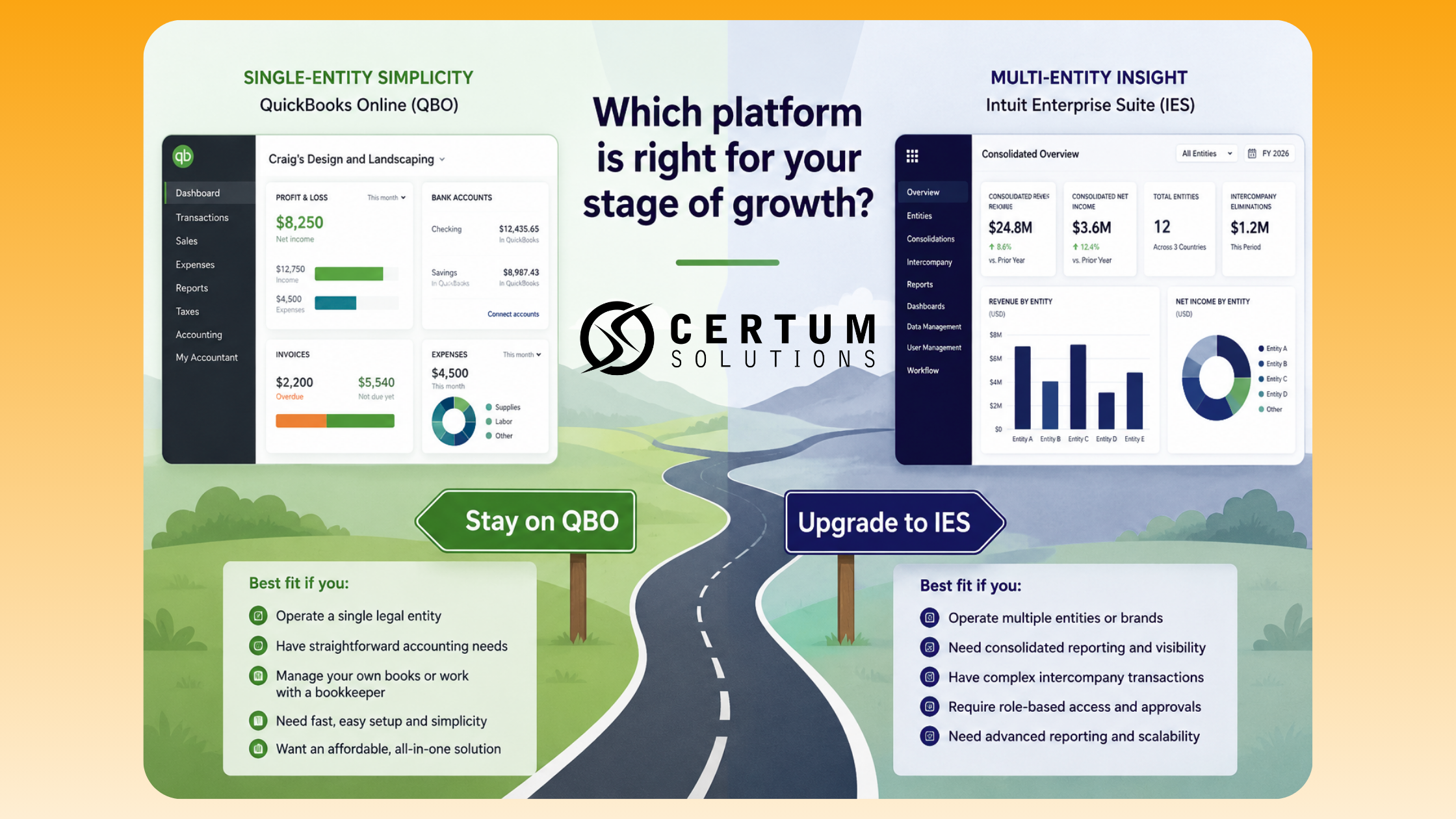
Our Honest Recommendation: When to Choose Each
We're certified implementation partners for Intuit and QuickBooks products. We don't have a favorite — we have the right tool for each client's situation.
Here's what we tell most clients:
Start with QBO Plus or Advanced if you're under $5M in revenue, running a single entity, and your team is under 25. You'll get more value from clean books and a proper setup than from a more complex system. If your books need work first, a QuickBooks cleanup is often the right starting point before evaluating anything else. Explore our outsourced bookkeeping services→
Consider IES seriously if you're managing multiple entities, your finance team is spending hours consolidating data, or you're ready for a more integrated platform across finance, projects, and people. Explore Intuit Enterprise Suite setup and support →
Don't upgrade prematurely. IES is more complex to implement and requires more training investment. It's worth it for the right business — but it's not a shortcut.
“We help businesses figure out which platform makes sense before they commit; and we handle implementation either way.”
Ready to figure out which platform is right for your business?
Frequently Asked Questions
What is the difference between QuickBooks Online and Intuit Enterprise Suite?
QuickBooks Online is single-entity cloud accounting for small businesses (up to 25 users). Intuit Enterprise Suite (IES) is a mid-market platform for multi-entity businesses needing consolidated reporting, advanced budgeting, and workforce management at scale.
How much does Intuit Enterprise Suite cost?
IES pricing is custom — it depends on the number of users, legal entities, and modules. Estimates typically range from $2,500–$10,000+/year. Because it can replace multiple QBO subscriptions plus manual consolidation work, the ROI is often stronger than it appears. Contact Certum Solutions for a tailored quote.
Can QuickBooks Online manage multiple entities?
No. QuickBooks Online manages one company file per subscription. Businesses with multiple LLCs or subsidiaries must maintain separate QBO accounts and manually consolidate data. Intuit Enterprise Suite handles multi-entity management, intercompany transactions, and consolidated reporting natively from a single login.
When should a business move from QuickBooks Online to Intuit Enterprise Suite?
Consider IES when: you manage 2+ legal entities, your team is approaching the 25-user limit, you're spending hours consolidating reports across accounts, or you need multi-dimensional reporting and advanced budgeting that QBO Advanced can't deliver. If you're under $5M revenue with a single entity, QBO Advanced is likely still the right fit.
Do I need to migrate my data when upgrading from QBO Advanced to Intuit Enterprise Suite?
No. For existing QuickBooks Online Advanced users, Intuit links accounts on the back end using unique IDs. You do not need to re-enter data or reconfigure third-party app integrations — bank feeds and existing integrations are maintained automatically. For migrations from QuickBooks Desktop or non-Intuit platforms, our team handles the full process. See our step-by-step IES migration guide for details.
What is the user limit for QuickBooks Online Advanced?
QuickBooks Online Advanced supports up to 25 billable users, plus 3 accountant firm users and unlimited time-tracking-only and reports-only users. If your team needs more than 25 full-access users, Intuit Enterprise Suite is the natural next step — supporting up to 500 users.
Does Intuit Enterprise Suite work for construction or project-based businesses?
Yes. IES includes project costing, time tracking, resource planning, AI-generated project 360-degree insights, and approval workflows built into the financial layer. For construction and professional services firms tracking cost-to-complete and project margins, IES provides significantly more depth than QBO Advanced's job costing tools.
Can Intuit Enterprise Suite replace NetSuite or Sage Intacct?
For some mid-market businesses, yes. IES is positioned as an ERP-adjacent platform at a lower implementation cost and complexity than full ERPs like NetSuite or Sage Intacct. Businesses that need consolidated multi-entity financials, advanced reporting, and integrated HR/payroll — but not full supply-chain ERP — often find IES hits the sweet spot.
How do I find a certified Intuit Enterprise Suite implementation partner?
Certum Solutions is a certified Intuit and QuickBooks solutions provider offering implementation, setup, and ongoing support for both QBO and IES. We offer free 30-minute consultations to help businesses determine which platform is the right fit before committing to a migration or upgrade.
Does IES include inventory management?
Not in the same way QuickBooks Enterprise does. IES supports basic inventory tracking within its financial workflows, but it does not include the advanced inventory features found in QuickBooks Enterprise — such as multi-location tracking, barcode scanning, serial and lot number tracking, or manufacturing-level controls. If advanced inventory management is your primary requirement, QuickBooks Enterprise is likely the better fit. If your priority is multi-entity financial management and consolidated reporting, IES is built for that. Not sure which applies to your situation? Book a free 30-minute consultation and we'll tell you directly.
I'm on QuickBooks Desktop or Enterprise — is this guide for me?
Not quite. This guide compares QuickBooks Online to Intuit Enterprise Suite for businesses already working in the cloud. If you're currently on QuickBooks Desktop or QuickBooks Enterprise, read our Intuit Enterprise Suite vs. QuickBooks Enterprise comparison instead — it covers the migration path from desktop software specifically. Intuit Enterprise Suite vs. QuickBooks Enterprise →
Not sure which platform is right for you?
Free consultation · No obligation · We'll give you a straight answer based on how your business actually operates.
Certum Solutions, helping business owners choose and implement the right accounting platform for how they actually operate. Questions? Reach our team at help@certumsolutions.com or 980-210-6946.