Fund Accounting Explained: How Nonprofits Track Restricted and Unrestricted Money
QUICK SUMMARY: This guide is written for U.S.-based nonprofit staff, board treasurers, and founders who keep hearing the term "fund accounting" and want a straight answer. It covers the restricted-vs-unrestricted distinction, why standard bookkeeping software doesn't handle this automatically, and how to set it up correctly in QuickBooks Online. A short real-world example is included, along with the most common fund accounting mistakes we see in nonprofit books. Want your setup checked? Book a free nonprofit accounting consultation with Certum Solutions.
What Fund Accounting Actually Means
Fund accounting is a method of tracking money by its source and any restrictions attached to it, rather than treating all income as one undifferentiated total. Instead of a single bottom line, a nonprofit's books track multiple "funds" side by side; general operating money, a restricted grant, a building campaign each with its own balance and its own rules for how it can be spent.
This is the accounting framework the IRS and most state charity regulators expect nonprofits to use, and it's the reason nonprofit financial statements look structurally different from a business's income statement and balance sheet.
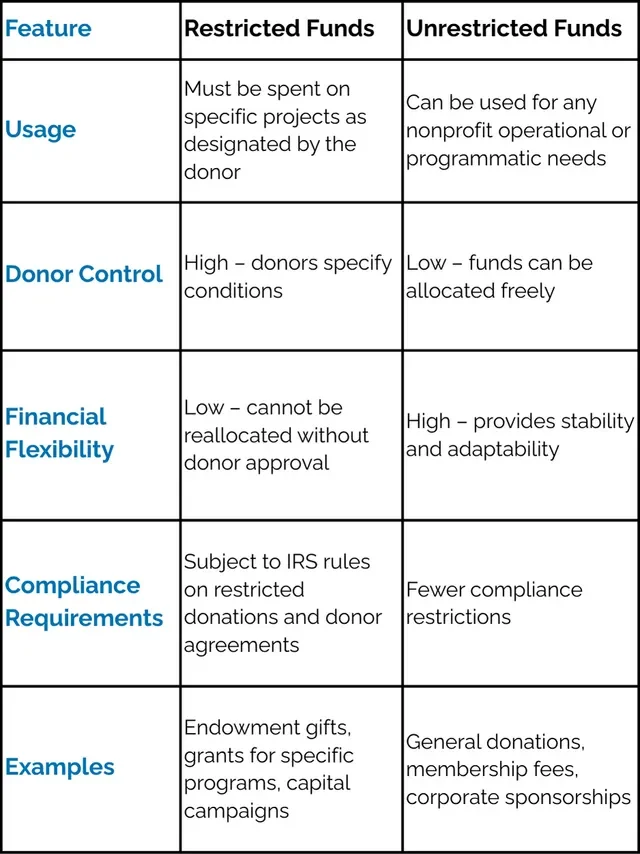
Restricted vs. Unrestricted Funds: The Core Distinction
Restricted Funds
Restricted funds come with donor- or grantor-imposed conditions on how and when they can be spent; a grant earmarked for a specific program, or a donation given "for building renovations only." These funds have to be tracked separately and reported on separately; spending them outside their restriction can jeopardize future funding and, in serious cases, your tax-exempt status.
Unrestricted Funds
Unrestricted funds can be used for any legitimate organizational purpose; general operating donations, unrestricted grants, and most membership dues typically fall here. This is the money that gives a nonprofit's leadership actual flexibility.
Board-Designated Funds
Board-designated funds are technically unrestricted; the donor placed no legal restriction on them, but the board has internally earmarked them for a specific purpose, like a reserve fund. They're often the category small nonprofits forget to track separately, which then makes board reporting harder than it needs to be.
Why Regular Bookkeeping Software Doesn't Do This Automatically
QuickBooks Online, Xero, and most general accounting software are built around a for-profit model by default; one chart of accounts, one bottom line, no built-in concept of donor restriction. Fund accounting has to be configured on top of that using classes, locations, or sub-accounts, and it has to be set up correctly from the start, because retrofitting it into a year of unstructured transactions is a much larger project than setting it up right the first time.
How Fund Accounting Shows Up on Your Financial Statements
A nonprofit's core financial statements, the Statement of Financial Position and the Statement of Activities, report net assets by classification: with donor restrictions, and without donor restrictions. If your bookkeeping isn't tracking funds correctly at the transaction level, these statements either can't be produced accurately or have to be manually reconstructed every time someone needs them, which is exactly the kind of scramble that shows up right before an audit or a board meeting.
Setting Up Fund Accounting in QuickBooks Online
Use QuickBooks Online Plus or Advanced (not Simple Start), which supports the class and location tracking fund accounting depends on.
Set up a nonprofit-specific chart of accounts, with net asset accounts split by restriction status rather than one generic equity account.
Use classes to track funds and programs, and locations if you operate at more than one site or run distinct grant-funded projects.
Record restricted donations and grants directly into their fund/class at the time they're received, not after the fact.
Run a Statement of Activities by class regularly, not just at year-end, so restriction violations get caught while they're still fixable.
A Real Example: What Fund Tracking Solved for One Nonprofit
Stanley Enrich Radio Club (STEM ARC), a Lancaster, SC STEM education nonprofit, had no formal chart of accounts structure before working with Certum Solutions; just general categories that didn't distinguish fund sources. "Katie and Nicole stood out to me," said founder Vicki Carnes. "They guided me through every step, helped with chart of accounts setup, and made the entire process manageable." With a properly coded chart of accounts in place, STEM ARC's federal 990 and South Carolina annual filings became straightforward instead of a source of year-round stress.
Common Fund Accounting Mistakes We See
Depositing a restricted grant into the general operating account with no class or sub-account tracking it separately.
Recognizing a multi-year grant as full income the year it's received, instead of over the period it's meant to cover.
Treating board-designated reserves as if they carry the same legal restriction as a donor-restricted fund.
Never running a fund-level report until an auditor or grantor specifically asks for one.
Who Actually Needs Formal Fund Accounting
Any organization that has 501(c)(3) status, receives restricted donations or grants, or files a Form 990 needs fund accounting in some form; this isn't optional based on organization size. A very small, all-volunteer group with no restricted funding and no filing requirement yet can hold off on the full structure but should build toward it before accepting a first restricted grant.
Frequently Asked Questions
What is the simplest definition of fund accounting?
Fund accounting tracks money by its source and any donor-imposed restrictions, keeping restricted and unrestricted funds separate instead of treating all income as one total. It's the method nonprofits use instead of standard for-profit accounting.
What's the difference between restricted and unrestricted funds?
Restricted funds come with donor- or grantor-imposed conditions on how they can be spent. Unrestricted funds can be used for any legitimate organizational purpose at the board's discretion.
Does QuickBooks Online support fund accounting?
Yes, but not automatically. It requires QuickBooks Online Plus or Advanced and a deliberate setup using classes, locations, and a nonprofit-specific chart of accounts with net assets split by restriction.
What are board-designated funds?
Board-designated funds are technically unrestricted, no donor placed a legal restriction on them, but the organization's board has internally set them aside for a specific purpose, like a reserve. They're often tracked incorrectly as regular operating funds.
What happens if a nonprofit doesn't use fund accounting correctly?
Restricted funds can get spent outside their intended purpose without anyone noticing until an audit or grant report catches it, which can jeopardize future funding and, in serious cases, tax-exempt status.
Do small nonprofits need fund accounting, or just larger ones?
Any organization receiving restricted donations or grants, or filing a Form 990, needs fund accounting regardless of size. Very small, all-volunteer groups with no restricted funding yet can hold off but should set it up before accepting their first restricted grant.
How is fund accounting different from regular business bookkeeping?
Business bookkeeping tracks one bottom line for one set of owners. Fund accounting tracks multiple funds side by side, each with its own balance and spending rules, and reports net assets by restriction status rather than as a single equity figure.
Can an existing QuickBooks file be fixed to add fund accounting, or does it require starting over?
In most cases it can be fixed without starting over; the chart of accounts gets restructured, and classes get applied going forward, with historical transactions reclassified where it matters for compliance. We walk through what that looks like in our QuickBooks nonprofit setup checklist.